Skip to content

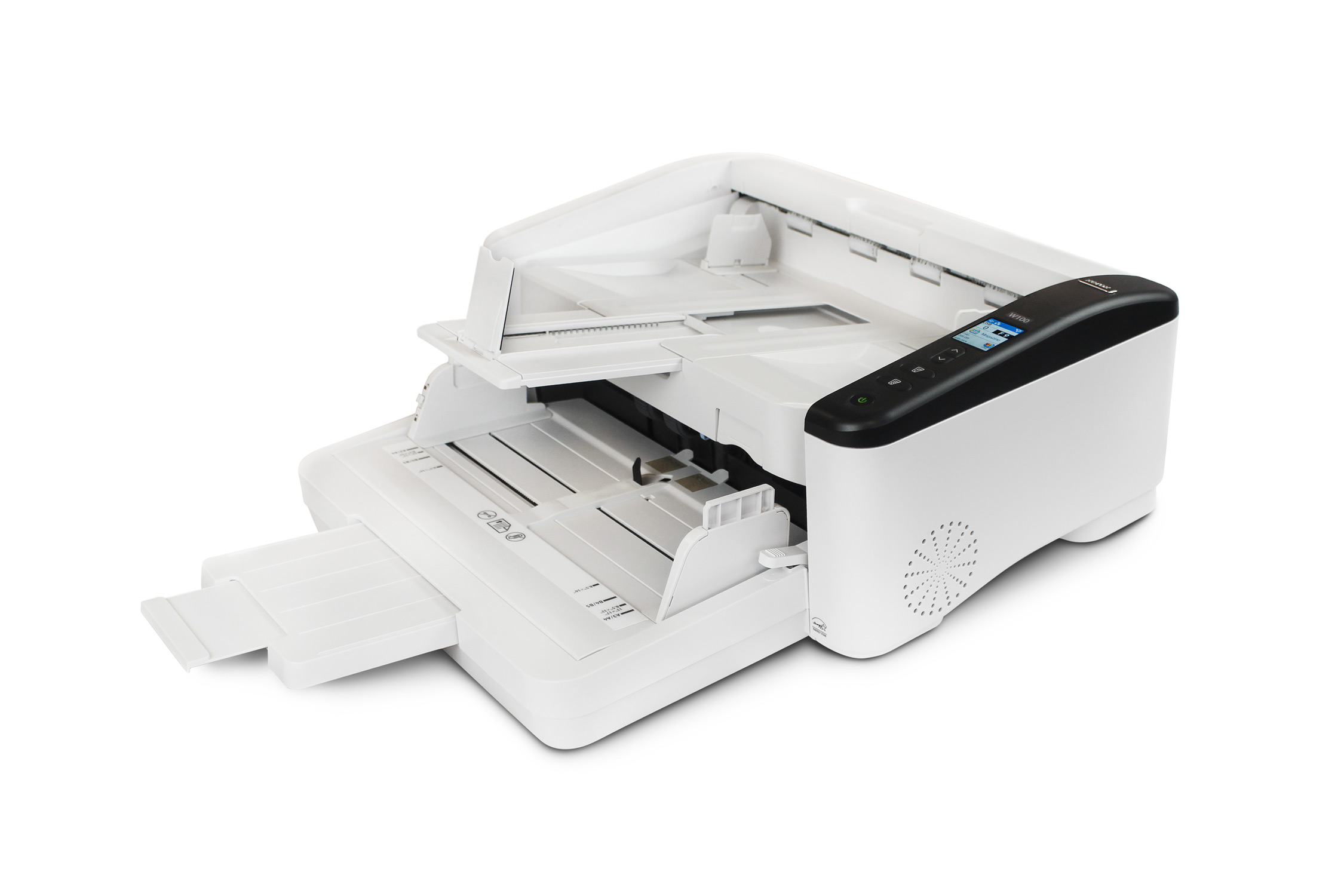
Xerox W100 Scanner

Sale!
  • Scan speeds up to 100 ppm / 200 ipm
  • 50,000-page daily duty cycle
  • 350-sheet automatic document feeder*
  • Supports paper sizes up to A3/Tabloid
  • Visioneer® OneTouch, Capture SE and Organizer AI applications
  • On-Board Acuity Hardware Image Processing

Original price was: $3,599.00.Current price is: $2,499.00.

SKU: XW100-U Category: Tag:

Specifications

Shop Our Store

1-800-648-0410
Monday - Friday (except holidays)
6:00 a.m. - 4:00 p.m. Pacific Time (GMT -08:00)

Contact Us
Where to Buy
Xerox W100 Scanner
Model
XW100-U
System Requirements
  • Intel i3 or equivalent CPU
  • Internet access (for installation)
  • Available USB 3.1 Port (USB 2.0 and 3.0-compatible)
  • Microsoft® Windows® 7 (Service Pack 1), 10, 11 32-bit or 64-bit operating system or later
  • Minimum of 4 GB internal memory (RAM)
  • Minimum available hard disk space: 350 MB for the scanner driver 1 GB for Visioneer OneTouch 1 to 3 GB for each additional application
Specifications
  • Model number: XW100-U
  • Part number:100N04341
  • Scan speed:100 ppm / 200 ipm @ 300 dpi
  • Scan method:Automatic Document Feeder (ADF)
  • Double-feed detection:Ultrasonic double-feed detection
  • Automatic duplex:Yes
  • Image sensor:Dual CIS (front & back)
  • Light source:LED
  • Optical resolution:600 dpi
  • Output Resolution:1,200 dpi
  • Output Bit Depth:24-bit color, 8-bit grayscale, 1-bit B&W
  • Connectivity:USB 3.2 Gen1x1, Ethernet 10/100/1000
  • Display:1.8” LCD display
  • Supported Operating Systems:Windows® 11, 10, 7
  • Supported Drivers:TWAIN, ISIS, WIA
  • Supported File Formats:BMP, PNG, GIF, JPEG, Single-Page PDF, Multi-Page PDF, Multi-page TIFF, TIFF, RTF, TXT, XPS, DOC, XLS, PPT, DOCX, XLSX, PPTX, HTML
  • Trays collapsed:(W x D x H) 18.11" x 12.2" x 7.8" (460 x 310 x 198 mm)
  • Trays expanded:(W x D x H) 18.11" x 26.8" x 7.8" (460 x 680 x 198 mm)
  • Weight:26.4 lb. (12 kg)
  • Background Color:Grey
  • ADF Capacity:350 sheets
  • Scanning Media Supported:Paper, plastic ID cards, photos
  • Supported ADF paper thickness:(straight path) 40 ~ 413 g/m² (10.6 – 110 lb. )
  • Supported ADF paper thickness:(u-turn path) 40 ~ 210 g/m² (10.6 – 56 lb.)
  • ADF Maximum Document size:12.15" x 240" (308 x 6,096 mm)
  • ADF Minimum Document size:1.96" x 2.6" (50 x 65 mm)
  • Maximum card thickness: Up to 0.056” (1.44 mm)
  • Software for Windows: Visioneer OneTouch, Visioneer Capture SE, Visioneer Organizer AI, Visioneer Acuity, ABBYY FineReader PDF Pro
  • Software for Android™ and iOS: Visioneer Mobile Capture (Android & iOS/ iPadOS)
What's in the box
  • Xerox W100 Scanner
  • power supply and adapter
  • USB cable
  • Network cable
  • Quick Install guide
  • Warranty and Registration cards

Product Description

Compact by Design, Powerful by Nature

For too long businesses have had to choose between capability and convenience. Large production scanners deliver the performance but take too much space and strain the budget. Smaller, cheaper devices keep things tidy but fall short when the workload gets serious. The Xerox® W100 Scanner changes that equation entirely.

Engineered from the ground up to deliver light production performance in a remarkably compact footprint, the Xerox® W100 Scanner brings together everything a modern office needs: versatility, connectivity, volume capacity, and intelligent software, all at a price point that makes sense for businesses of every size.

Versatile, Connected, and Ready for Business

Whether you’re scanning contracts, architectural drawings, medical records, or multi-page reports, the Xerox® W100 Scanner handles it all with ease. Native network connectivity means the whole office can share a single device, streamlining workflows and eliminating bottlenecks. Furthermore, support for a wide range of media types, sizes, and weights means there’s no job too varied and no document too demanding. Scan everything from delicate single-sheet documents to thick multi-page dossiers, from standard letter-size correspondence to full A3 technical drawings and spreadsheets, all with consistent, high-quality results every time.

Built to Handle Volume

When the workload piles up, you need a scanner that keeps pace. Engineered for light production environments, the Xerox® W100 Scanner is ready for high daily volumes without skipping a beat. A robust, 350-sheet automatic document feeder handles large batches effortlessly, letting you load up and get on with other tasks while the scanner does the heavy lifting. Whether it’s the morning post, end-of-month invoices, or a large archiving project, the W100 takes it in its stride.

Yet speed and volume mean nothing if documents are damaged along the way. That’s why the Xerox® W100 features a paper protection mechanism that safeguards every page from the moment it enters the feeder to the moment it exits.

Powered by the Visioneer® Intelligent Software Platform

Great hardware is only half the story. Bundled with the Visioneer® Intelligent Software Platform, the Xerox® W100 Scanner becomes a complete document management solution straight out of the box, pairing powerful hardware with an equally capable software layer.

Smart scanning technology automatically optimizes every scan, correcting skew, removing backgrounds, and enhancing contrast for clean, professional results. Built-in OCR converts scans into searchable, editable files in formats like PDF, Word, and Excel, making information instantly accessible and cutting down on manual data entry.

Automated workflows push efficiency further: define custom routing rules to send files directly to a network folder, email, cloud storage, or business application with a single button press, eliminating repetitive steps and reducing error.

Easy to set up, simple to use, and endlessly customizable, the platform grows with your business, whether you’re a small office needing straightforward scanning or a larger organization with complex document demands.

Warranties

Parts & Accessories

Xerox W100 Scanner Parts and Accessories

Part # Description SKU Price
Part #: 65-3170-000 Torque Limiter for W100 Series SKU: 65-3170-000 $64.40 Add to Cart
Part #: 65-3169-000 W100 series Reverse Roller Cover SKU: 65-3169-000 $26.80 Add to Cart

Drivers & Manuals

W100 series Reverse Roller Cover

W100 series Reverse Roller Cover
Register Your Product >

Note: You must uninstall your current driver and OneTouch software to install an updated driver.

If your computer blocks the download for security reasons, you need to click the top bar for options, then try the download again.

Operating Systems Compatibility: As listed in section “Minimum System Requirements”. This scanner is not compatible with Windows Me or Windows 98. Support for Windows 2000 has ended with OneTouch version 4.5

Related Links

Visioneer Update

Auto Check for Available Drivers & Software
Visioneer Update will automatically detect your scanner and check for the latest drivers and bundled software. You may choose to use Update or you may download only the driver and software you need from the links below. Be advised that many of the bundled software packages can only be downloaded through Visioneer Update or the installation DVD. For technical support, please contact us.

Driver for Windows 11, 10, 7. Includes DriverPLUS and Acuity Technology.

Certified TWAIN and WIA drivers

This download includes Windows device driver(s) required to operate your scanner, all applicable TWAIN and WIA drivers, and Acuity (Automatic Intelligent Image Correction Software). See product specifications for supported drivers.

ISIS driver

Download only if your application requires ISIS driver.

Visioneer VAST Network© utilities for network sharing.

Visioneer Network Driver for Windows 11, 10, 7

Multilingual

VND_COM6.0 B

Visioneer Mobile Capture for Android 8 and up

Scan directly to your mobile device from any network enabled scanner
Download from the Google Play Store

Visioneer Mobile Capture for iOS 12.4 and up

Scan directly to your mobile device from any network enabled scanner
Download from the App Store

OneTouch 4 Software for Microsoft Windows 11, 10, 8, 7

OneTouch 4.x software for OneTouch and button scanning

Visioneer OneTouch is a utility that connects scanner buttons with pre-selected destinations (and/or applications) and allows you to scan into these destinations by simply pressing one button. Destinations can include your email, Word processor, printer or simply a file folder.

Multilingual

OT4.4.6.XX585.5 MB

Xerox DocuShare 7.x link for Visioneer OneTouch 4.x software

"This link allows documents to be sent directly from Visioneer OneTouch to Xerox DocuShare 7.x software. NOTE: Prior to installing the link, please download and install the latest version of Xerox DocuShare Drive at Xerox DocuShare Downloads."

Multilingual

OT4DS.4.6.323.2228.XX1.7 MB

Xerox Docushare Flex link for Visioneer OneTouch 4.x software

This link allows documents to be sent directly from Visioneer OneTouch to Xerox DocuShare Flex software.

Multilingual

OT4DSF.4.6.324.1160.XX1.7 MB

Manuals and Documentation

Windows – OneTouch Guides

Includes details on OneTouch software.

Chinese (Simplified)

OneTouchGuide.CN2.4 MB

German

OneTouchGuide.DE2.6 MB

English

OneTouchGuide.EN2.4 MB

Spanish

OneTouchGuide.ES2.7 MB

French

OneTouchGuide.FR2.4 MB

Italian

OneTouchGuide.IT2.9 MB

Korean

OneTouchGuide.KO2.4 MB

Portuguese

OneTouchGuide.PT2.5 MB

Russian

OneTouchGuide.RU3.1 MB

Turkish

OneTouchGuide.TR2.3 MB

Chinese (Traditional)

OneTouchGuide.TW2.7 MB

Windows – Visioneer Network Driver User Guides

Describes scanning via network.

German

VND Guide.DE3.2 MB

English

VND Guide.EN2.9 MB

Spanish

VND Guide.ES2.4 MB

French

VND Guide.FR2.4 MB

Russian

VND Guide.RU2.6 MB

Android – Visioneer Mobile Capture User Guides

Describes scanning via network.

English

VMC_Guide.EN4.8 MB

iOS – Visioneer Mobile Capture User Guides

Describes scanning via network.

English

VMC_Guide_IOS.EN5.9 MB
Close Select Your Region